|
SpinfirePro_aktivering
Ladda ner =>
Installera => Aktivera
A) Nedladdning
- Se install alternativ nedan = hämtar program + startar
installation
B) Installation
- Om inte installation kommer igång automatiskt kan ni starta
manuellt => klicka på spinfire.exe
C) Aktivering
- Scrolla
neråt och vid mitten av sidan ser ni layout på ett exempel
på aktivering med seat ID.
<= installera först
Aktuella
versioner av huvudprogram Spinfire Pro (client):
Version 10 ersätter samtliga tidigare versioner.
Den finns i 2 olika nedladdningar:
SPINFIRE
PRO
10
för PC =>
huvudprogram för användare
OBS! Alla behöver nya
Microsoft
Framework 4 för nya Spinfire 10.
Hämta: Microsoft.NET Framework4 => net4) överst (
punkt C) 1. nedan)
Därefter
1: fungerar installationen.
Därefter 2: kör windows update = extra säkerhet.
A)
Pro 10
update or
new
FULL install
(v10.1 all-in-one-file 263MB)
B)
Pro 10
update or
new quick install
(v10.1 web interactive 124MB)
C)
Installation Quick Guide
1. förutsättningar Spinfire 10
install-spinfire-10
2. aktivera, steg Spinfire-aktivera
Spinfire 9.0 och 10.
3. i menyn SUPPORT hittar ni extra hjälp
vid behov.
D) Floating license only
=> FlexLM
info and install (not for locked license)
E) Extra - utökad info
Spinfire 10 - allmänna fördjupande kunskaper
1. Admin install Spinfire 10 - EU install-spinfire-10
2.
Admin install Spinfire 10
- USA adm-install-spinfire-10
3.
Dokumentation here
(svensk google översättning här)
^^^^^^^^^^^^^^^^^^^^^^^^^^^^^^^^^^^^^^^^^^^^^^
Äldre versioner (old versions)
9.0 kan installeras parallellt
med 8.4 och fungerar mycket bra.
Vissa CatiaV5 användare vill ha toleransjustering som i 8.4 + 10(ej
9).
9.0 är första releasen av ny programvara => installationen
enklare/snabbare.
Om ni önskar välja att installera endast 8.4 eller både 8.4 + 9.0
samtidigt
så går det bra men vissa nyligen nytillkomna installerar
bara version 9 och är mycket nöjda.
Spinfire Pro 9.0
för klient =
user
(rev:1452, 8 jan
2011=> ny
01 Mars 2011)
A)
Pro 9
update
complete
build:1435 (199MB) rev:1452
B)
Pro 9
web-interactive
build:1435 (7,9MB) rev:1452
C) Guide
for install:
- 8.4 läs nedan = see info below
- 9.0 klicka på länk => see info SpinfirePro_9.x
^^^^^^^^^^^^^^^^^^^^^^^^^^^^^^^^^^^^^^^^^^^^^^

2 Snabbval av de senaste
downloads
Välj
gärna QUICK UPDATE som fungerar utmärkt om brandvägg och internet
OK.
Quick update
minst v8.3
=> 8.4.1 build:1347 (54MB)
Complete full
full
download
8.4.1 build:1347 (830MB)
Quick update för
snabb/enkel internet nedladdning - full fart.
Quick update kan även användas vid ominstallation (t ex repair)
Complete = när äldre version t ex V8.2 eller internet
problem/brandvägg mm.
***)mer detaljerad info om nedladdning längst ner på sidan.
^^^^^^^^^^^^^^^^^^^^^^^^^^^^^^^^^^^^^^^^^^^^^^
OBS!
AKTIVERING
AKTIVERING
av Spinfire Pro
Ni behöver licensnummer = seat ID.
Starta SpinFire Pro
Se vänster sida "OPTIONS" gå till "ACTIVATION"
.
(variant: meny TOOLS > Activation)
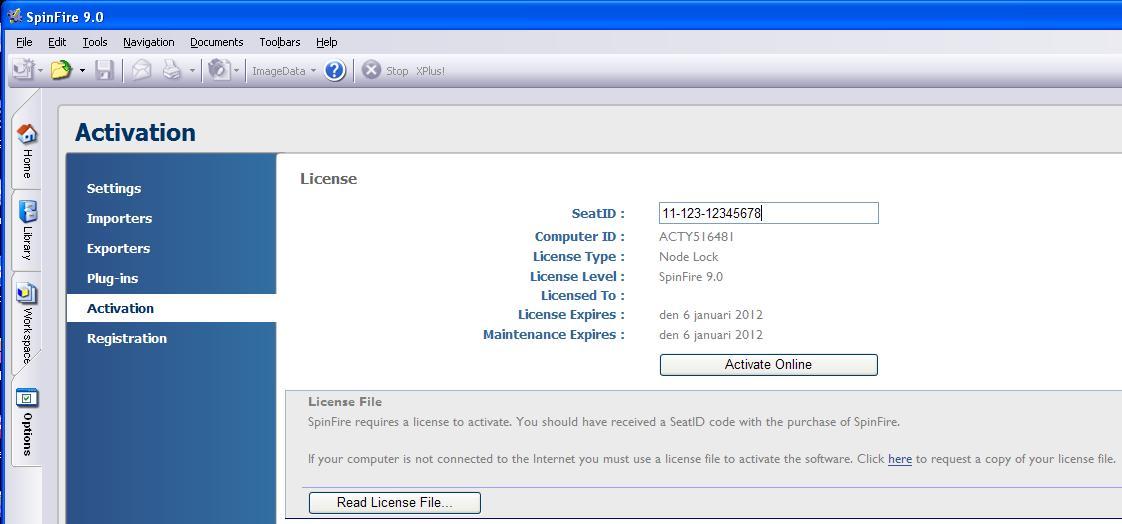
Bilden nedan visar aktuell sida.
Aktivering kan göras på denna sida ONLINE.
Fyll i seat ID (översta raden) och tryck på Activate Online.
Om allt ok så gratuleras ni.
Ni hamnar nu på en ny sida där ni ombedes registrera er.
Registrering är ej obligatorisk och kan avbrytas
(avsluta > gå till annan flik/mapp)
eftersom ni redan registrerat er i tidigare aktivitet ovan
dvs Spinfire Pro 8.4 update REGISTRATION.
Klart!
Activation
sida i Spinfire - t ex nedan licens är utan gällande avtal och
behöver förnyas.
Flertalet licenser fungera efter det datum men
pga uppdateringar i windows och cad-filer så är ett aktivt avtal
värdefullt.
(instruktioner för flytande licens
med FlexLM på server eller nätverks-PC....läs
mer...)
steg 2
Nu är det klart att börja användas....men...
uppdatera era IMPORTERS.
De med röd download text kan uppdateras.
Vissa är ACTIVE andra TRIAL pga
att ACTIVE är de som ingår i er licens.
Kör download på de med röd text.
Klart!
I importer listan finns OPTIONS till höger.
Öppna detta (olika för varje sort) och ändra inställningar
om det uppstår problem någon gång när ni ska öppna cad-filer.
Lycka till!
More info ....background (extra
support information - questions?)
8.4 update NOTE - read = more understanding what to do????
Question: I've installed SpinFire 8.4. Now what?
I've upgraded to SpinFire 8.4.
Are there any instructions on how to activate and use the product?
Solution:
First of all, let's make sure that you know the difference
between 8.3 and 8.4.
* SpinFire Professional 8.3 is now updated and called
SpinFire 8.4
* Prior to 8.4, Actify had three separate desktop products:
- Reader: downloadable for free and only works in IE
- SpinFire Professional: Actify's flagship desktop product that
requires licensing
- SpinFire for Microsoft Office: SpinFire running as an ActiveX
control within
Office. Also requires separate licensing.
8.4 is a single product that encompasses all three 8.3 products in
one.
What this means is that you can run SpinFire 8.4 in a browser, as a
desktop app
or as an ActiveX control in Office, all running in the same mode or
what we call
platforms and have exactly the same UI. The only difference is what
functions
will be active based on the license obtained. The 4 platforms are
basically the
types of license you'll need to purchase to get SpinFire 8.4 to work:
- Reader: This is the only platform where you don't need to pay, but
you'll still
need to obtain a license. Once activated with a Reader license,
SpinFire 8.4 will
run with limited capabilities similar to 8.3 Reader except with the
full SpinFire UI.
Now you get the full SpinFire UI, even within IE, the Office dialog
and the
embedded object. The initial version of 8.4 has a bug with loading
.3D in IE.
Check this issue for work-around -
http://support.actify.com/issue_view.asp?ID=3381. And just like
the old Reader,
SpinFire 8.4 with this license can only read and write .3D file.
Spinfire Markup and Lite are new products with functionality
between free
READER and Professional. Most Scandinavia/Nordic EU users have
Professional and free READER.
- Markup: Similar to Reader but with a few additional
dimensioning capabilities.
- Lite: Pro functionalities, minus importing and the ability
to use plug-ins
- Professional: Full SpinFire functionalities. What Importers
and/or plug-ins will
work depends on what is actually purchased. Draft Angle Analysis is,
at the
present time (September 2009), the only plug-in that needs to be
purchased; all
others are free for use with the Pro license.
* You can upgrade 8.4 over 8.3 without uninstalling whatever Actify
products is
already there. The only exception is 8.4 does not work correctly
with Publisher,
yet. It is NOT recommended to install 8.4 on a system where
Publisher is
installed(same computer).
* Limited testing has been done on Vista and 64-bit systems. For the
most part,
the product does work on either system, though there are reported
bugs
specifically on Vista. SpinFire 8.4 is a 32-bit app and will run in
32-bit mode on
64-bit systems.
* Licensing
Whatever license you had when using 8.3 or earlier will need to be
upgraded to
work with 8.4. We needed to modify our licensing to support the 4
platforms.
Please contact your reseller or Actify sales rep to request an
update to your
license. If your seat is a floating seat, you will need to update
both the Seat
ID/license file as well as the floating license file
(sfpflv2.dat). This means you'll
need to update the floating license server with the new sfpflv2.dat
file before
you can activate the updated 8.4 installs.
You can activate SpinFire 8.4 through any of the three apps: Browser,
Desktop
or Office, though it may be easier to activate using SpinFire
Desktop.
* Office
With 8.3 we also offered a product called SpinFire for Microsoft
Office (SFO)
that allowed users to embed .3D files into Word, Excel or Powerpoint
and it
required a separate license. In 8.4 the Office capability comes for
free. It run in
whatever platform that Desktop is licensed for. The SpinFire Office
functionality
is found under Insert in 2003 and Add-Ins in 2007. Keep in mind that
this is first
version of a single SpinFire product, so it's likely you may
encounter some bugs
especially when running in Office. If so, we would appreciate it if
you could
report the bugs to http://support.actify.com/.
** KNOWN BUG - 8.4 Office does
not work on Vista.
* Plug-ins
Plug-ins have been verified to work with 8.4. The only issue would
be with Draft
Angle Analysis (DAA). As this is a purchased feature, it needs to be
included
in the license. If you upgrade and currently have DAA, please make
sure to
remind your reseller or Actify sales rep to include DAA in the
updated license.
* .3D files
There is no format change in .3D between 8.3 and 8.4. This means
that .3D files
created using 8.2, 8.3 or 8.4 can be read using any one of the
aforementioned
SpinFire versions.
Fixa problem enkelt?
Starta om = löser vissa
problem snabbt och enkelt.
I vissa fall behövs en omstarta av program och
om det ej hjälper så starta om datorn.
En omstart släpper ev låsningar, hjälper brandväggen,
aktiverar datorns ID och licens kontroll.
Kontakta oss eller er kontaktperson om problem kvartstår.
***)mer detaljerad info om nedladdning HÄR nedan:
INSTRUKTIONER
1. Uppgradering:
OBS! Endast från 8.3 + 8.4 => 8.4.1 (= V8.4 build 1347)
Övriga måste göra fullständig installation(complete full).
- Gå till 1=>quick update: klicka på
download
- antingen spara fil eller kör direkt på SFPro.exe.
(öppna mapp om ni parat fil)
- klicka på SFPro.exe så startar installationen
Nu uppdateras systemet från V8.3 till V8.4.
Gå till punkt 3 för seat ID update = ny-aktivering.
2. FULL DOWNLOAD installation (complete full):
- Gå till: 2. complete full download 8.4 build 1337 och ladda ner
(spara fil).
- öppna mapp med sparad fil
- därefter öppna zip-mappen: kör un-zip all (extrahera alla
filer)
- en ny mapp skapas med "vanliga" filer (oftast bredvid
zip-mappen)
- öppna nya mappen och klicka på SFPro.exe => installationen
startar.
- svara på några frågor. Om ni ej vet svaret välj gärna mest/bäst
(säkrare).
- Spinfire 8.4 är installerat. Om ny installation => aktivera
licensen.
- (aktiveringsinfo på supportsidan för instruktioner)
Gå till punkt 3 nedan för seat ID update = ny-aktivering.
|